W OBD2 turns your phone into a live dashboard for your motorcycle: speed, RPM, gear, coolant temperature, battery, trip meters and fault codes, read through a small Bluetooth OBD2 dongle. Built for bikes whose stock dash shows almost nothing.
What you need
An Android phone with Chrome. iPhone is not supported (iOS browsers have no Web Bluetooth).
A Bluetooth Low Energy (BLE 4.0+) ELM327 OBD2 dongle, see the tested list below.
A bike with standard OBD2 (in Europe, roughly Euro 4 / 2017 and newer).
KTM 690 / Husqvarna 701: the bike has KTM's own diagnostic plug instead of the standard car connector: you also need the small OBD2 adapter cable (a few euros, the same one used for TuneECU). Check which plug your bike has before you buy: white on the older bikes, red on Euro 5 (2021 and newer). And not every adapter is wired the same way: riders have found two cables with the correct plug where one works and the other doesn't, so buy one you can send back.
Get started
1
Plug the dongle into the bike's OBD2 socket and switch the ignition on. Where you sit the dongle matters, more than most people expect.
2
Open the app in Chrome, go to Settings and pick your bike profile.
3
Tap Scan & connect and choose your dongle from the list. (OBDLink CX: Android asks a pairing confirmation the first time, accept it.) Not in the list?
4
Recommended: install it as an app: the Install app card in Settings, or Chrome menu → Add to Home screen.
Tip: don't pair the dongle in Android's Bluetooth settings, always connect it from inside the app.
The dashboard
Speed: GPS by default; switch to the bike's own OBD speed in Settings.
RPM, throttle, coolant, battery voltage: live from the ECU.
Trip 1 / Trip 2: two resettable trip meters (in Settings). Use Trip 1 as your tank meter and reset it at each fill-up: most motorcycles never report fuel level over OBD2, so there is deliberately no fuel gauge.
Outside temperature appears only if your bike reports it.
The engine warning icon lights when the ECU has a stored fault.
A short demo animation plays at startup; real data takes over as soon as a dongle connects. A permanent demo mode is available in Settings ("Simulated data").
Choosing your layout
The dashboard is not fixed. In Settings, under Dashboard layout, you choose how many values you see and which one is the big one.
Pick a shape: from a single full-screen value up to all nine. The fewer you show, the bigger the numbers get.
Fill the boxes: each box is lettered A, B, C. You choose what goes in each one from the nine values. Nothing stops you putting the same value in twice.
One shape covers both ways round: portrait and landscape are two views of the same choice, so the dashboard still follows the phone when you turn it. The Portrait / Landscape buttons only preview the shapes, they do not lock the app either way.
Colours: blue, amber or green.
Two things never move, whatever you choose. The engine warning icon keeps its corner, and a value that goes critical (coolant too hot, battery too low) appears as a red warning even if you left it off your layout. Warnings are always red, whatever colour you picked.
Riding with a split screen, or want nothing but speed and gear? Take the 1, 2 or 3 value shapes. Want everything? The 9 value shape is the one you already know, and it stays the default.
Gear display
KTM 690 Enduro R / SMC R profile: true gear straight from the ECU, including N, even rolling with the clutch in. Confirmed on Euro 5 bikes (2021 and newer), the ones whose own dash shows a gear number. On earlier 690s the ECU may simply not answer, and the app falls back to the estimate.
Generic profile: gear is estimated from RPM and speed and labelled Gear (est.). It learns your bike's gearing as you ride.
The tile label tells you which one you got:Gear means it is being read from the ECU, Gear (est.) means it is calculated. If you are on an older 690 and you get a real Gear, please tell me: that is how the supported list grows.
Husqvarna 701 / GasGas 700 share the KTM platform and will likely work with the KTM profile, reports welcome. Riding something else? See Explore your own bike.
Fault codes
On the Data page you can read stored fault codes (with plain-language descriptions for standard P0 codes) and clear them. Clearing also resets the emission readiness monitors: do it only after the problem is fixed.
Staying connected
While the app is open, a dropped connection reconnects by itself (it keeps retrying for about 80 seconds).
After you close and reopen the app, tap the Tap to reconnect button on the dashboard. Android Chrome doesn't let web apps reconnect silently, so one tap is required.
The screen stays awake while connected (toggle in Settings).
The dongle never appears in the scan
You tap Scan & connect and your dongle is not in the list at all, so there is nothing to connect to. Work through these in order: the first one catches most cases.
Un-pair it in Android's Bluetooth settings. If you paired the dongle there, your phone keeps reconnecting to it by itself, and a BLE device that is already connected stops advertising: no scan can see it any more, not this app's and not anyone else's. Forget the device in Android's Bluetooth settings, switch the ignition off and on, then scan again from inside the app. You never need to pair it there. (The OBDLink CX asks for a pairing confirmation, but during the connection itself, from the app.)
Check the dongle is actually powered. With the ignition on, its LED should light up. No light means no 12 V reaching it, and on a KTM 690 / Husqvarna 701 that points at the adapter cable rather than at the dongle.
Check it really is BLE. "Bluetooth 3.0", "Bluetooth Classic" and WiFi dongles cannot work with this app, whatever the box says about ELM327. Watch out for product families that sell both under nearly the same name: the Vgate iCar Pro exists as BLE 4.0 (works) and as BT 3.0 (cannot).
Android permissions. Chrome needs the Nearby devices / Location permission to scan at all, and on older Android versions system Location also has to be switched on.
Not sure which of those you have? Android's own Bluetooth settings can see Classic devices, this app cannot. So: if the dongle used to show up in the app's scan and only stopped after you paired it in Android, it is the pairing, un-pair it. If Android's settings can find and pair with it but the app's scan has never seen it, not even when it was new, then it is a Classic Bluetooth device and no browser app can reach it, whatever the box says about ELM327.
A dongle that does appear and connect, but never delivers any data, is a different fault: it is powered and talking to your phone, but not reaching the ECU. On a KTM 690 / Husqvarna 701 the adapter cable is the first suspect there, since two cables that look identical can be wired differently.
It connects when parked, then dies when you ride
If the dongle pairs perfectly with the bike on its stand and then goes silent the moment you set off, the problem is where the dongle sits, not whether the app supports your bike. Standing next to the bike, your phone is a hand's width away and punches through whatever is in the path. Sat on the bike and riding, with your own body added to the shielding, it cannot.
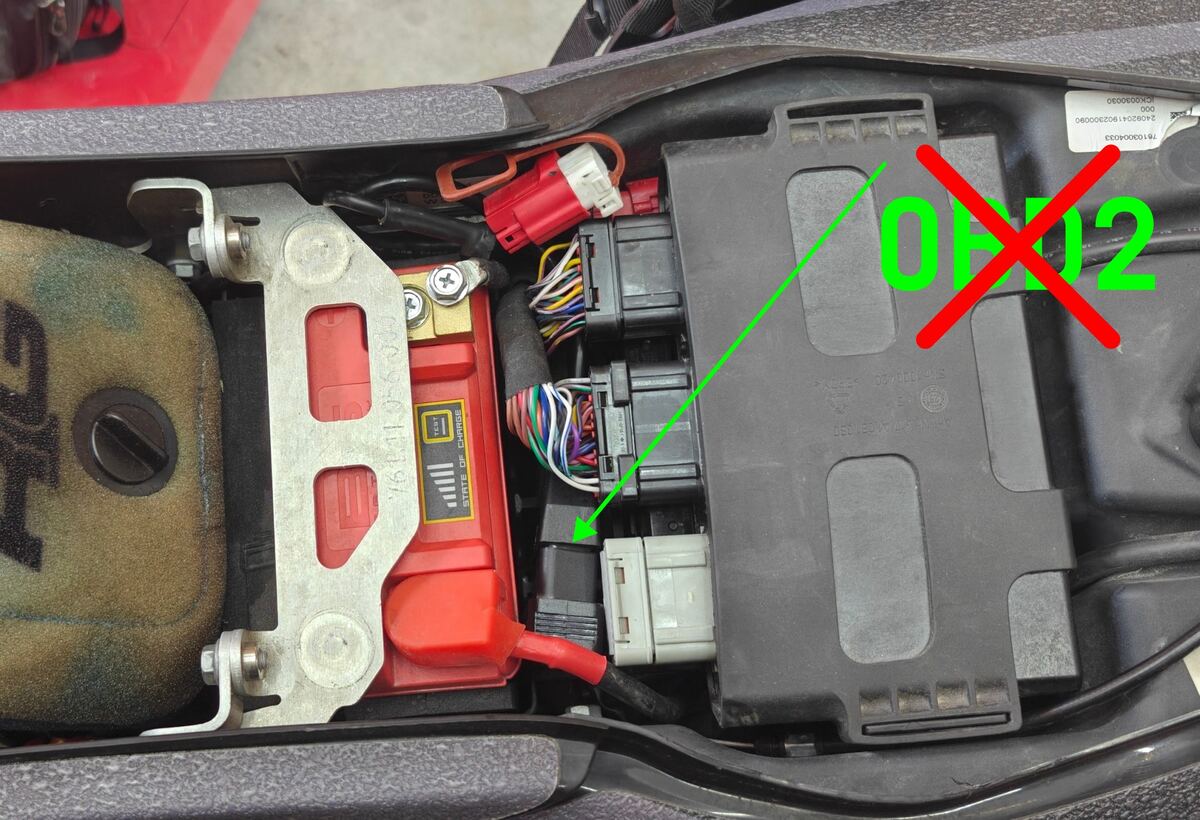
The usual culprit has a name: the ECU, the bike's engine control unit. On many motorcycles the obvious hiding place under the seat is directly under or beside it, and the ECU is a large shielded box that blocks Bluetooth at close range. Metal brackets, the battery and the subframe do the same to a lesser degree.
The fix is always the same: put the dongle on top of everything, not buried under it. A spot with only plastic and the seat between it and you beats the deepest, tidiest cavity every time.
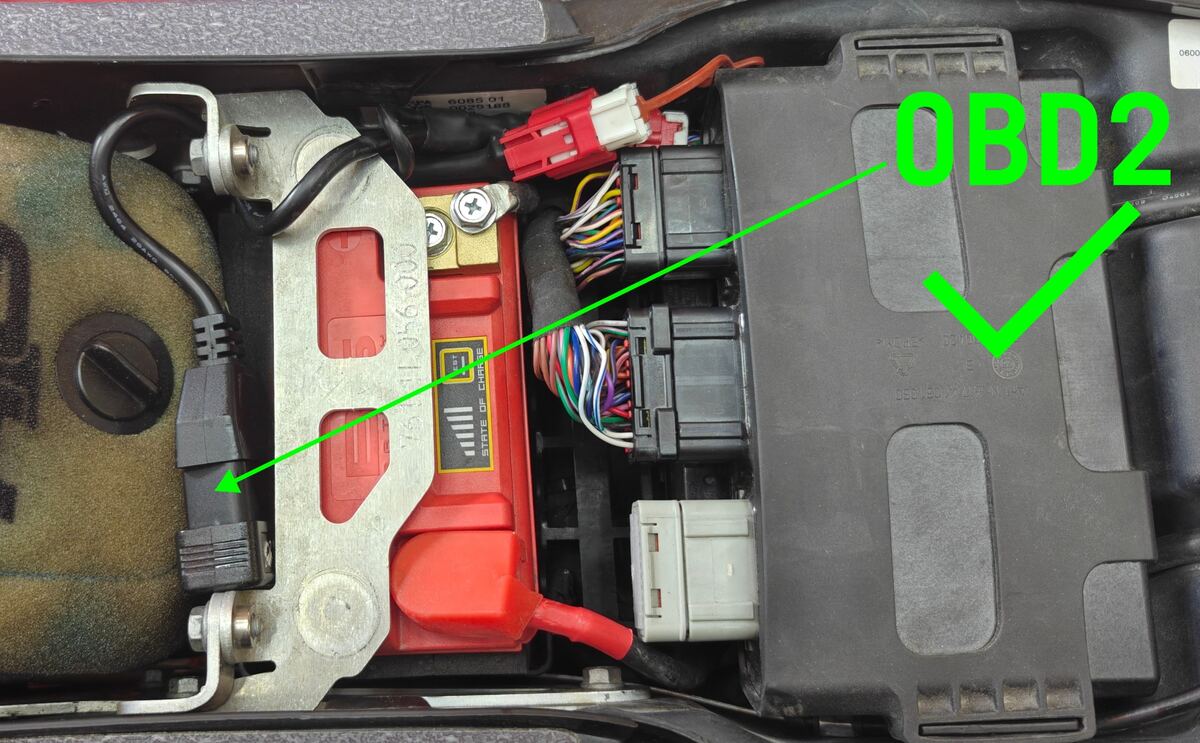
Worked example, KTM 690 Enduro R / SMC R:
✕ The tempting spot: the dongle pushed down into the cavity next to the battery, which sits directly under the ECU (the big black box on the right). Connects on the stand, silent as soon as you ride.✓ The fix: the dongle on top of everything, on the far side of the battery, as far from the ECU as the space allows. Works perfectly.
Take the ECU out to free the dongle from underneath it, then refit the ECU.
Nudge the battery across to open up a slot beside it.
Sit the dongle on top, on the airbox side, and let the cable run under it.
The standard KTM adapter cable is long enough for this, no extension needed.
If your bike has no free space on top, a short OBD2 extension cable that brings the dongle out into the open does the same job.
Compatible dongles
Dongle
Notes
✓
Veepeak OBDCheck BLE+
~25 €, tested on the KTM 690
✓
Vgate iCar Pro BLE 4.0
~30 €, reported working by a tester. Only the "BLE 4.0" version, the "BT 3.0" one has no BLE
✓
Vgate vLinker MC+
~40 €, tested on the KTM 690
✓
OBDLink CX
~85 €, tested, fast and solid
✕
Cheap "blue" ELM327 clones
Classic Bluetooth, invisible to the app
✕
DMD M1
Does not advertise BLE: Android's Bluetooth settings pairs with it, the app's scan never sees it
✕
WiFi dongles
Not supported
Rule of thumb: it must say Bluetooth Low Energy / BLE 4.0+, and it must be an ELM327. BLE on its own is not enough: a Bluetooth box built to serve one particular app can be a fine device and still be unreachable from here. Other BLE ELM327 dongles will likely work.
Explore your own bike
Settings has a Test mode card. Switch it on and you get the engineering tools I used to work out what the KTM 690 exposes, pointed at your bike instead. It is all there, free, with nothing to unlock, so run as many tests as you like.
Manual command: a plain ELM327 terminal. Send anything and read the raw answer, with one-tap buttons for the usual starting points.
Deep scan: sweeps service 21, Mode 22 and the diagnostic sessions and flags what changed. Run it in neutral, run it again in first: the differences are the interesting addresses.
Gear probe: watches candidate addresses live and logs every change. Ride up through the box, then copy the log.
Connection log: everything the dongle said, copyable.
Diagnostic log: records what your bike reports while you ride, and exports it as a CSV.
This is how model-specific support gets added. If you turn something up on your bike, or send me a diagnostic log with the make, model and year, it can become a real profile like the 690's.
Before you start: a deep scan pauses the gauges for a few minutes, so run it parked. And the manual terminal sends exactly what you type, so check what a command does before you send it to your ECU.
Feedback
Bug reports and bike reports (make, model, year, what worked) are very welcome: info@weathergpx.com.
From the maker of weathergpx.com.
Aide
W OBD2 transforme votre téléphone en tableau de bord pour votre moto : vitesse, régime, rapport engagé, température moteur, batterie, trips et codes défaut, lus via un petit boîtier OBD2 Bluetooth. Conçu pour les motos dont le tableau de bord d'origine n'affiche presque rien.
Ce qu'il vous faut
Un téléphone Android avec Chrome. iPhone non pris en charge (pas de Web Bluetooth sur iOS).
Un boîtier ELM327 OBD2 Bluetooth Low Energy (BLE 4.0+), voir la liste testée ci-dessous.
Une moto avec OBD2 standard (en Europe, en gros Euro 4 / 2017 et plus récent).
KTM 690 / Husqvarna 701 : la moto a la prise diagnostic KTM au lieu du connecteur standard : il faut aussi le petit câble adaptateur OBD2 (quelques euros, le même que pour TuneECU). Vérifiez quelle prise porte votre moto avant d'acheter : blanche sur les modèles anciens, rouge sur les Euro 5 (2021 et plus récent). Et tous les adaptateurs ne sont pas câblés pareil : des pilotes ont eu deux câbles avec la bonne prise dont un seul fonctionnait, alors prenez-en un que vous pouvez renvoyer.
Ouvrez l'appli dans Chrome, allez dans Settings et choisissez votre profil moto.
3
Appuyez sur Scan & connect et choisissez votre boîtier dans la liste. (OBDLink CX : Android demande une confirmation d'appairage la première fois, acceptez.) Absent de la liste ?
4
Recommandé : installez-la comme appli : carte Install app dans Settings, ou menu Chrome → Ajouter à l'écran d'accueil.
Astuce : n'appairez pas le boîtier dans les réglages Bluetooth d'Android, connectez-le toujours depuis l'appli.
Le tableau de bord
Vitesse : GPS par défaut ; vitesse OBD de la moto au choix dans Settings.
Régime, gaz, température moteur, tension batterie : en direct depuis l'ECU.
Trip 1 / Trip 2 : deux compteurs remis à zéro dans Settings. Utilisez Trip 1 comme jauge de réservoir en le remettant à zéro à chaque plein : la plupart des motos ne transmettent jamais le niveau d'essence par OBD2, il n'y a donc volontairement pas de jauge.
Température extérieure : affichée seulement si votre moto la fournit.
L'icône moteur s'allume quand l'ECU a un défaut enregistré.
Une courte démo s'affiche au démarrage ; les vraies données prennent le relais dès qu'un boîtier se connecte. Un mode démo permanent existe dans Settings (« Simulated data »).
Choisir votre affichage
Le tableau de bord n'est pas figé. Dans Settings, sous Dashboard layout, vous choisissez combien de valeurs vous voyez et laquelle est la grande.
Choisissez une forme : d'une seule valeur plein écran jusqu'aux neuf. Moins vous en affichez, plus les chiffres sont gros.
Remplissez les cases : chaque case porte une lettre A, B, C. Vous choisissez ce qui va dedans parmi les neuf valeurs. Rien ne vous empêche de mettre deux fois la même.
Une forme vaut dans les deux sens : portrait et paysage sont deux vues du même choix, le tableau suit donc toujours le téléphone quand vous le tournez. Les boutons Portrait / Paysage servent seulement à prévisualiser, ils ne bloquent pas l'application.
Couleurs : bleu, ambre ou vert.
Deux choses ne bougent jamais, quel que soit votre choix. L'icône moteur garde son coin, et une valeur qui devient critique (moteur trop chaud, batterie trop basse) s'affiche en alerte rouge même si vous l'avez laissée hors de votre affichage. Les alertes sont toujours rouges, quelle que soit la couleur choisie.
Vous roulez en écran partagé, ou vous ne voulez que la vitesse et le rapport ? Prenez les formes 1, 2 ou 3 valeurs. Vous voulez tout ? La forme 9 valeurs est celle que vous connaissez déjà, et elle reste celle par défaut.
Affichage du rapport
Profil KTM 690 Enduro R / SMC R : vrai rapport lu dans l'ECU, y compris le N, même en roulant embrayage tiré. Confirmé sur les Euro 5 (2021 et plus récent), celles dont le tableau de bord d'origine affiche déjà un rapport. Sur les 690 antérieures, l'ECU peut tout simplement ne pas répondre, et l'appli retombe alors sur l'estimation.
Profil Generic : rapport estimé à partir du régime et de la vitesse, affiché Gear (est.). Il apprend la démultiplication de votre moto en roulant.
Le libellé de la tuile vous dit lequel vous avez :Gear signifie lu dans l'ECU, Gear (est.) signifie calculé. Si vous êtes sur une 690 plus ancienne et que vous obtenez un vrai Gear, dites-le moi : c'est comme ça que la liste s'agrandit.
Husqvarna 701 / GasGas 700 partagent la plateforme KTM et devraient fonctionner avec le profil KTM, retours bienvenus. Vous roulez autre chose ? Voir Explorer votre propre moto.
Codes défaut
Sur la page Data, lisez les codes défaut enregistrés (avec descriptions en clair pour les codes P0 standard) et effacez-les. L'effacement remet aussi à zéro les moniteurs antipollution : ne le faites qu'une fois le problème résolu.
Rester connecté
Tant que l'appli est ouverte, une connexion perdue se rétablit toute seule (nouvelles tentatives pendant environ 80 secondes).
Après fermeture et réouverture de l'appli, appuyez sur le bouton Tap to reconnect du tableau de bord. Chrome Android n'autorise pas la reconnexion silencieuse des applis web, un appui est nécessaire.
L'écran reste allumé tant que la connexion est active (réglable dans Settings).
Le boîtier n'apparaît jamais dans la liste
Vous appuyez sur Scan & connect et votre boîtier n'est pas dans la liste : il n'y a donc rien à connecter. Faites ces vérifications dans l'ordre, la première résout la plupart des cas.
Supprimez l'appairage dans les réglages Bluetooth d'Android. Si vous avez appairé le boîtier là, votre téléphone s'y reconnecte tout seul, et un appareil BLE déjà connecté cesse d'émettre : plus aucune recherche ne le voit, ni celle de l'appli ni celle d'une autre. Oubliez l'appareil dans les réglages Bluetooth, coupez puis remettez le contact, et relancez la recherche depuis l'appli. Vous n'avez jamais besoin de l'appairer là. (L'OBDLink CX demande bien une confirmation d'appairage, mais pendant la connexion elle-même, depuis l'appli.)
Vérifiez que le boîtier est bien alimenté. Contact mis, sa LED doit s'allumer. Pas de lumière : pas de 12 V, et sur une KTM 690 / Husqvarna 701 cela désigne le câble adaptateur plutôt que le boîtier.
Vérifiez que c'est vraiment du BLE. Les boîtiers « Bluetooth 3.0 », « Bluetooth Classic » et WiFi ne peuvent pas fonctionner avec cette appli, quoi que dise la boîte à propos de l'ELM327. Attention aux gammes vendues sous des noms presque identiques : le Vgate iCar Pro existe en BLE 4.0 (fonctionne) et en BT 3.0 (impossible).
Autorisations Android. Chrome a besoin de l'autorisation Appareils à proximité / Localisation pour chercher, et sur les versions plus anciennes d'Android la localisation système doit aussi être activée.
Vous ne savez pas dans quel cas vous êtes ? Les réglages Bluetooth d'Android voient les appareils Classic, pas cette appli. Donc : si le boîtier apparaissait dans la recherche de l'appli et n'a disparu qu'après que vous l'avez appairé dans Android, c'est l'appairage, supprimez-le. Si les réglages d'Android le trouvent et l'appairent mais que la recherche de l'appli ne l'a jamais vu, même neuf, alors c'est un appareil Bluetooth Classic et aucune appli web ne peut l'atteindre, quoi que dise la boîte à propos de l'ELM327.
Un boîtier qui apparaît et se connecte, mais ne fournit jamais de données, c'est une autre panne : il est alimenté et parle à votre téléphone, mais n'atteint pas l'ECU. Sur une KTM 690 / Husqvarna 701, le premier suspect est là encore le câble adaptateur, car deux câbles d'apparence identique peuvent être câblés différemment.
Connecté à l'arrêt, plus rien en roulant
Si le boîtier se connecte parfaitement moto sur la béquille, puis devient muet dès que vous partez, le problème vient de l'endroit où le boîtier est placé, pas de la compatibilité de votre moto. Debout à côté de la moto, votre téléphone est à une main de distance et traverse tout ce qui gêne. Assis dessus et en roulant, avec votre propre corps qui s'ajoute au blindage, il n'y arrive plus.
Le coupable habituel a un nom : l'ECU, le calculateur moteur. Sur beaucoup de motos, la cachette évidente sous la selle se trouve juste dessous ou juste à côté, et l'ECU est un gros boîtier blindé qui bloque le Bluetooth à courte distance. Les supports métalliques, la batterie et le cadre arrière font la même chose, en moins fort.
La solution est toujours la même : poser le boîtier par-dessus tout, pas l'enterrer dessous. Un emplacement qui n'a que du plastique et la selle entre lui et vous vaut mieux que la cavité la plus profonde et la mieux rangée.
Exemple concret, KTM 690 Enduro R / SMC R :
✕ L'emplacement tentant : le boîtier enfoncé dans la cavité à côté de la batterie, qui se trouve juste sous l'ECU (le gros boîtier noir à droite). Ça se connecte sur la béquille, et plus rien dès qu'on roule.✓ La solution : le boîtier posé par-dessus tout, de l'autre côté de la batterie, aussi loin de l'ECU que la place le permet. Fonctionne parfaitement.
Sortez l'ECU pour libérer le boîtier qui est dessous, puis remontez l'ECU.
Décalez la batterie pour ouvrir une place à côté d'elle.
Posez le boîtier dessus, côté boîte à air, et faites passer le câble en dessous.
Le câble adaptateur KTM d'origine est assez long pour ça, aucune rallonge nécessaire.
Si votre moto n'a aucune place libre par-dessus, une petite rallonge OBD2 qui sort le boîtier à l'air libre fait le même travail.
Boîtiers compatibles
Boîtier
Notes
✓
Veepeak OBDCheck BLE+
~25 €, testé sur KTM 690
✓
Vgate iCar Pro BLE 4.0
~30 €, signalé comme fonctionnel par un testeur. Uniquement la version « BLE 4.0 », la « BT 3.0 » n'a pas de BLE
✓
Vgate vLinker MC+
~40 €, testé sur KTM 690
✓
OBDLink CX
~85 €, testé, rapide et fiable
✕
Clones ELM327 « bleus » pas chers
Bluetooth Classic, invisibles pour l'appli
✕
DMD M1
N'émet pas en BLE : les réglages Bluetooth d'Android l'appairent, la recherche de l'appli ne le voit jamais
✕
Boîtiers WiFi
Non pris en charge
Règle simple : il doit être Bluetooth Low Energy / BLE 4.0+, et être un ELM327. Le BLE seul ne suffit pas : un boîtier Bluetooth conçu pour une appli précise peut être excellent et rester inaccessible ici. Les autres boîtiers ELM327 BLE devraient fonctionner.
Explorer votre propre moto
Les Settings contiennent une carte Test mode. Activez-la et vous obtenez les outils techniques qui m'ont servi à découvrir ce que la KTM 690 expose, cette fois braqués sur votre moto. Tout est là, gratuitement et sans rien à débloquer : faites autant de tests que vous voulez.
Manual command : un vrai terminal ELM327. Envoyez ce que vous voulez et lisez la réponse brute, avec des boutons pour les points de départ habituels.
Deep scan : balaye le service 21, le Mode 22 et les sessions de diagnostic, et signale ce qui a changé. Lancez-le au point mort, relancez-le en première : les différences sont les adresses intéressantes.
Gear probe : surveille en direct les adresses candidates et enregistre chaque changement. Montez les rapports, puis copiez le journal.
Connection log : tout ce qu'a dit le boîtier, copiable.
Diagnostic log : enregistre ce que votre moto rapporte pendant que vous roulez, et l'exporte en CSV.
C'est comme ça que le support d'un modèle se construit. Si vous trouvez quelque chose sur votre moto, ou si vous m'envoyez un journal de diagnostic avec la marque, le modèle et l'année, cela peut devenir un vrai profil comme celui de la 690.
Avant de commencer : un deep scan met les cadrans en pause quelques minutes, faites-le à l'arrêt. Et le terminal envoie exactement ce que vous tapez : vérifiez ce que fait une commande avant de l'envoyer à votre ECU. Ces outils sont en anglais.
Retours
Bugs et rapports moto (marque, modèle, année, ce qui a fonctionné) bienvenus : info@weathergpx.com.
Par le créateur de weathergpx.com.
Hilfe
W OBD2 macht dein Handy zum Live-Cockpit für dein Motorrad: Geschwindigkeit, Drehzahl, Gang, Kühlmitteltemperatur, Batterie, Tageskilometer und Fehlercodes, gelesen über einen kleinen Bluetooth-OBD2-Adapter. Gebaut für Motorräder, deren Serientacho fast nichts anzeigt.
Was du brauchst
Ein Android-Handy mit Chrome. iPhone wird nicht unterstützt (kein Web Bluetooth auf iOS).
Einen Bluetooth-Low-Energy-(BLE 4.0+) ELM327-OBD2-Adapter, siehe die getestete Liste unten.
Ein Motorrad mit Standard-OBD2 (in Europa grob Euro 4 / ab 2017).
KTM 690 / Husqvarna 701: das Motorrad hat KTMs eigenen Diagnosestecker statt des Standard-Anschlusses: du brauchst zusätzlich das kleine OBD2-Adapterkabel (wenige Euro, dasselbe wie für TuneECU). Prüfe vor dem Kauf, welchen Stecker dein Motorrad hat: weiß bei den älteren Modellen, rot bei Euro 5 (ab 2021). Und nicht jeder Adapter ist gleich verdrahtet: Fahrer hatten zwei Kabel mit dem richtigen Stecker, von denen nur eines funktionierte, kauf also eines, das du zurückschicken kannst.
App in Chrome öffnen, in die Settings gehen und dein Motorrad-Profil wählen.
3
Scan & connect antippen und den Adapter aus der Liste wählen. (OBDLink CX: Android fragt beim ersten Mal nach einer Kopplungsbestätigung, annehmen.) Nicht in der Liste?
4
Empfohlen: als App installieren: die Install app-Karte in den Settings oder Chrome-Menü → Zum Startbildschirm hinzufügen.
Tipp: den Adapter nicht in Androids Bluetooth-Einstellungen koppeln, immer aus der App heraus verbinden.
Das Cockpit
Geschwindigkeit: standardmäßig GPS; in den Settings auf die OBD-Geschwindigkeit des Motorrads umschaltbar.
Drehzahl, Gasgriff, Kühlmittel, Bordspannung: live aus dem Steuergerät.
Trip 1 / Trip 2: zwei rücksetzbare Tageszähler (in den Settings). Nutze Trip 1 als Tankuhr und setze ihn beim Tanken zurück: die meisten Motorräder melden den Tankstand nie über OBD2, deshalb gibt es bewusst keine Tankanzeige.
Außentemperatur erscheint nur, wenn dein Motorrad sie liefert.
Das Motorwarnsymbol leuchtet, wenn im Steuergerät ein Fehler gespeichert ist.
Beim Start läuft eine kurze Demo-Animation; echte Daten übernehmen, sobald ein Adapter verbunden ist. Ein dauerhafter Demomodus ist in den Settings ("Simulated data").
Dein Layout wählen
Das Cockpit ist nicht fest. In den Settings wählst du unter Dashboard layout, wie viele Werte du siehst und welcher davon groß ist.
Form wählen: von einem einzigen bildschirmfüllenden Wert bis zu allen neun. Je weniger du anzeigst, desto größer werden die Zahlen.
Felder füllen: jedes Feld hat einen Buchstaben A, B, C. Du wählst aus den neun Werten, was hineinkommt. Denselben Wert zweimal zu nehmen ist erlaubt.
Eine Form gilt für beide Ausrichtungen: Hoch- und Querformat sind zwei Ansichten derselben Wahl, die Anzeige folgt also weiter dem Handy, wenn du es drehst. Die Schalter Hochformat / Querformat sind nur die Vorschau, sie legen die App nicht fest.
Farben: Blau, Bernstein oder Grün.
Zwei Dinge bleiben immer, egal was du wählst. Die Motorwarnleuchte behält ihre Ecke, und ein kritischer Wert (Motor zu heiß, Batterie zu schwach) erscheint als rote Warnung, auch wenn du ihn nicht auf dein Layout gelegt hast. Warnungen sind immer rot, egal welche Farbe du gewählt hast.
Du fährst mit geteiltem Bildschirm oder willst nur Tempo und Gang? Nimm die Formen mit 1, 2 oder 3 Werten. Du willst alles? Die Form mit 9 Werten ist die, die du schon kennst, und sie bleibt der Standard.
Ganganzeige
Profil KTM 690 Enduro R / SMC R: echter Gang direkt aus dem Steuergerät, inklusive N, auch rollend mit gezogener Kupplung. Bestätigt bei Euro 5 (ab 2021), also den Modellen, deren Serientacho selbst einen Gang anzeigt. Bei älteren 690ern antwortet das Steuergerät möglicherweise gar nicht, und die App fällt auf die Schätzung zurück.
Profil Generic: Gang aus Drehzahl und Geschwindigkeit geschätzt, angezeigt als Gear (est.). Lernt die Übersetzung deines Motorrads beim Fahren.
Die Beschriftung der Kachel sagt dir, was du bekommst:Gear heißt aus dem Steuergerät gelesen, Gear (est.) heißt berechnet. Wenn du auf einer älteren 690 ein echtes Gear bekommst, schreib mir: genau so wächst die Liste.
Husqvarna 701 / GasGas 700 teilen die KTM-Plattform und funktionieren wahrscheinlich mit dem KTM-Profil, Rückmeldungen willkommen. Fährst du etwas anderes? Siehe Erkunde dein eigenes Motorrad.
Fehlercodes
Auf der Data-Seite kannst du gespeicherte Fehlercodes lesen (mit Klartext-Beschreibungen für Standard-P0-Codes) und löschen. Das Löschen setzt auch die Abgas-Readiness-Monitore zurück: erst löschen, wenn das Problem behoben ist.
Verbunden bleiben
Solange die App offen ist, verbindet sich eine abgerissene Verbindung von selbst neu (Versuche über etwa 80 Sekunden).
Nach Schließen und Neuöffnen der App: den Tap to reconnect-Knopf auf dem Cockpit antippen. Android Chrome erlaubt Web-Apps keine stille Wiederverbindung, ein Tipp ist nötig.
Der Bildschirm bleibt an, solange verbunden (in den Settings umschaltbar).
Der Adapter taucht in der Suche gar nicht auf
Du tippst Scan & connect an und dein Adapter steht überhaupt nicht in der Liste, es gibt also nichts zu verbinden. Arbeite das der Reihe nach ab, der erste Punkt löst die meisten Fälle.
Entkopple ihn in Androids Bluetooth-Einstellungen. Wenn du den Adapter dort gekoppelt hast, verbindet sich dein Handy von selbst immer wieder mit ihm, und ein bereits verbundenes BLE-Gerät sendet keine Werbepakete mehr: keine Suche findet es noch, weder die dieser App noch die einer anderen. Gerät in den Bluetooth-Einstellungen entfernen, Zündung aus und wieder an, dann erneut aus der App heraus suchen. Dort koppeln musst du ihn nie. (Der OBDLink CX fragt zwar nach einer Kopplungsbestätigung, aber während des Verbindens selbst, aus der App.)
Prüfe, ob der Adapter überhaupt Strom hat. Bei eingeschalteter Zündung sollte seine LED leuchten. Kein Licht heißt keine 12 V, und bei einer KTM 690 / Husqvarna 701 deutet das auf das Adapterkabel und nicht auf den Adapter.
Prüfe, ob es wirklich BLE ist. „Bluetooth 3.0"-, „Bluetooth Classic"- und WiFi-Adapter können mit dieser App nicht funktionieren, egal was auf der Packung über ELM327 steht. Vorsicht bei Produktfamilien mit fast gleichen Namen: den Vgate iCar Pro gibt es als BLE 4.0 (funktioniert) und als BT 3.0 (unmöglich).
Android-Berechtigungen. Chrome braucht die Berechtigung Geräte in der Nähe / Standort, um überhaupt suchen zu können, und bei älteren Android-Versionen muss zusätzlich der System-Standort eingeschaltet sein.
Du weißt nicht, welcher Fall es ist? Androids Bluetooth-Einstellungen sehen Classic-Geräte, diese App nicht. Also: wenn der Adapter früher in der Suche der App auftauchte und erst nach dem Koppeln in Android verschwand, ist es die Kopplung, entkopple ihn. Wenn Androids Einstellungen ihn finden und koppeln können, die Suche der App ihn aber nie gesehen hat, auch nicht fabrikneu, dann ist es ein Bluetooth-Classic-Gerät, und keine Web-App kann es erreichen, egal was auf der Packung über ELM327 steht.
Ein Adapter, der auftaucht und sich verbindet, aber nie Daten liefert, ist ein anderer Fehler: er hat Strom und spricht mit dem Handy, erreicht aber die ECU nicht. Bei einer KTM 690 / Husqvarna 701 ist auch da das Adapterkabel der erste Verdächtige, denn zwei äußerlich gleiche Kabel können unterschiedlich verdrahtet sein.
Verbindet im Stand, nichts mehr beim Fahren
Wenn sich der Adapter auf dem Seitenständer problemlos verbindet und dann verstummt, sobald du losfährst, liegt es daran, wo der Adapter sitzt, nicht an der Kompatibilität deines Motorrads. Neben dem Motorrad stehend ist dein Handy eine Handbreit entfernt und kommt durch alles hindurch. Auf dem Motorrad sitzend und fahrend, mit deinem eigenen Körper als zusätzlicher Abschirmung, schafft es das nicht mehr.
Der übliche Verursacher hat einen Namen: die ECU, das Motorsteuergerät. Bei vielen Motorrädern liegt das naheliegende Versteck unter der Sitzbank direkt darunter oder daneben, und die ECU ist ein großer abgeschirmter Kasten, der Bluetooth auf kurze Distanz blockiert. Metallhalter, Batterie und Heckrahmen tun dasselbe, nur schwächer.
Die Lösung ist immer dieselbe: den Adapter obenauf legen, nicht darunter vergraben. Ein Platz, bei dem nur Kunststoff und die Sitzbank zwischen ihm und dir liegen, schlägt jede noch so tiefe und aufgeräumte Mulde.
Praxisbeispiel, KTM 690 Enduro R / SMC R:
✕ Der verlockende Platz: der Adapter in die Mulde neben der Batterie gedrückt, die direkt unter der ECU liegt (der große schwarze Kasten rechts). Verbindet im Stand, still sobald du fährst.✓ Die Lösung: der Adapter obenauf, auf der anderen Seite der Batterie, so weit von der ECU entfernt wie der Platz es zulässt. Funktioniert einwandfrei.
Die ECU herausnehmen, um den Adapter darunter zu befreien, dann die ECU wieder einbauen.
Die Batterie zur Seite schieben, um daneben einen Platz frei zu machen.
Den Adapter obenauf legen, zur Airbox-Seite hin, und das Kabel darunter durchführen.
Das serienmäßige KTM-Adapterkabel ist dafür lang genug, keine Verlängerung nötig.
Wenn dein Motorrad oben keinen freien Platz hat, leistet ein kurzes OBD2-Verlängerungskabel, das den Adapter ins Freie bringt, dasselbe.
Kompatible Adapter
Adapter
Hinweise
✓
Veepeak OBDCheck BLE+
~25 €, getestet auf der KTM 690
✓
Vgate iCar Pro BLE 4.0
~30 €, von einem Tester als funktionierend gemeldet. Nur die Version „BLE 4.0“, die „BT 3.0“ hat kein BLE
✓
Vgate vLinker MC+
~40 €, getestet auf der KTM 690
✓
OBDLink CX
~85 €, getestet, schnell und zuverlässig
✕
Billige „blaue" ELM327-Klone
Bluetooth Classic, für die App unsichtbar
✕
DMD M1
Sendet kein BLE: Androids Bluetooth-Einstellungen koppeln damit, die Suche der App sieht ihn nie
✕
WiFi-Adapter
Nicht unterstützt
Faustregel: er muss Bluetooth Low Energy / BLE 4.0+ sein und ein ELM327. BLE allein genügt nicht: eine Bluetooth-Box, die für eine bestimmte App gebaut wurde, kann gut sein und hier trotzdem unerreichbar bleiben. Andere BLE-ELM327-Adapter funktionieren wahrscheinlich.
Erkunde dein eigenes Motorrad
In den Settings gibt es eine Karte Test mode. Schalte sie ein und du bekommst die Technik-Werkzeuge, mit denen ich herausgefunden habe, was die KTM 690 preisgibt, nur eben auf dein Motorrad gerichtet. Alles kostenlos, nichts freizuschalten: mach so viele Tests wie du willst.
Manual command: ein echtes ELM327-Terminal. Schick was du willst und lies die Rohantwort, mit Knöpfen für die üblichen Startpunkte.
Deep scan: durchsucht Service 21, Mode 22 und die Diagnosesitzungen und markiert, was sich geändert hat. Einmal im Leerlauf, einmal im ersten Gang: die Unterschiede sind die interessanten Adressen.
Gear probe: beobachtet die Kandidaten-Adressen live und protokolliert jede Änderung. Schalte durch die Gänge, dann das Protokoll kopieren.
Connection log: alles, was der Adapter gesagt hat, kopierbar.
Diagnostic log: zeichnet während der Fahrt auf, was dein Motorrad meldet, und exportiert es als CSV.
Genau so entsteht modellspezifische Unterstützung. Wenn du an deinem Motorrad etwas findest, oder mir ein Diagnoseprotokoll mit Marke, Modell und Baujahr schickst, kann daraus ein echtes Profil werden wie bei der 690.
Vorher wissen: ein Deep Scan pausiert die Anzeigen für ein paar Minuten, also im Stand machen. Und das Terminal sendet genau das, was du tippst: prüfe, was ein Befehl bewirkt, bevor er an deine ECU geht. Die Werkzeuge sind auf Englisch.
Feedback
Fehlerberichte und Motorrad-Berichte (Marke, Modell, Jahr, was funktioniert hat) sind sehr willkommen: info@weathergpx.com.
Vom Macher von weathergpx.com.
Aiuto
W OBD2 trasforma il tuo telefono in un cruscotto live per la tua moto: velocità, giri, marcia, temperatura del liquido, batteria, contachilometri parziali e codici di errore, letti tramite un piccolo adattatore OBD2 Bluetooth. Pensato per le moto il cui cruscotto di serie mostra quasi nulla.
Cosa serve
Un telefono Android con Chrome. iPhone non supportato (niente Web Bluetooth su iOS).
Un adattatore ELM327 OBD2 Bluetooth Low Energy (BLE 4.0+), vedi la lista testata qui sotto.
Una moto con OBD2 standard (in Europa, all'incirca Euro 4 / dal 2017 in poi).
KTM 690 / Husqvarna 701: la moto ha la presa diagnostica KTM al posto del connettore standard: serve anche il piccolo cavo adattatore OBD2 (pochi euro, lo stesso usato per TuneECU). Controlla quale presa ha la tua moto prima di comprare: bianca sulle moto più vecchie, rossa sulle Euro 5 (dal 2021 in poi). E non tutti gli adattatori sono cablati allo stesso modo: alcuni motociclisti hanno avuto due cavi con la presa giusta di cui uno solo funzionava, quindi prendine uno che puoi rimandare indietro.
Per iniziare
1
Collega l'adattatore alla presa OBD2 della moto e metti il quadro acceso. Dove appoggi l'adattatore conta, più di quanto si creda.
2
Apri l'app in Chrome, vai in Settings e scegli il profilo della tua moto.
3
Tocca Scan & connect e scegli l'adattatore dalla lista. (OBDLink CX: la prima volta Android chiede una conferma di accoppiamento, accetta.) Non è nella lista?
4
Consigliato: installala come app: la scheda Install app in Settings, o menu Chrome → Aggiungi a schermata Home.
Suggerimento: non accoppiare l'adattatore nelle impostazioni Bluetooth di Android, connettilo sempre dall'app.
Il cruscotto
Velocità: GPS di default; in Settings puoi passare alla velocità OBD della moto.
Giri, gas, liquido di raffreddamento, tensione batteria: in diretta dalla centralina.
Trip 1 / Trip 2: due parziali azzerabili (in Settings). Usa Trip 1 come indicatore del serbatoio azzerandolo a ogni pieno: quasi nessuna moto trasmette il livello carburante via OBD2, quindi non c'è volutamente un indicatore benzina.
Temperatura esterna: compare solo se la tua moto la fornisce.
L'icona motore si accende quando la centralina ha un errore memorizzato.
All'avvio gira una breve demo; i dati reali subentrano appena un adattatore si connette. Un demo permanente è in Settings ("Simulated data").
Scegliere il tuo layout
Il cruscotto non è fisso. In Settings, sotto Dashboard layout, scegli quanti valori vedere e quale è quello grande.
Scegli una forma: da un solo valore a tutto schermo fino a tutti e nove. Meno ne mostri, più i numeri diventano grandi.
Riempi i riquadri: ogni riquadro ha una lettera A, B, C. Scegli tu cosa mettere in ciascuno tra i nove valori. Niente ti vieta di metterne due volte lo stesso.
Una forma vale in entrambi i sensi: verticale e orizzontale sono due viste della stessa scelta, quindi il cruscotto segue ancora il telefono quando lo giri. I pulsanti Verticale / Orizzontale servono solo all'anteprima, non bloccano l'app.
Colori: blu, ambra o verde.
Due cose non si spostano mai, qualunque sia la tua scelta. L'icona motore tiene il suo angolo, e un valore che diventa critico (motore troppo caldo, batteria troppo bassa) compare come avviso rosso anche se l'hai lasciato fuori dal tuo layout. Gli avvisi sono sempre rossi, qualunque colore tu abbia scelto.
Guidi a schermo diviso, o vuoi solo velocità e marcia? Prendi le forme da 1, 2 o 3 valori. Vuoi tutto? La forma da 9 valori è quella che già conosci e resta quella predefinita.
Indicatore marcia
Profilo KTM 690 Enduro R / SMC R: marcia vera letta dalla centralina, incluso il N, anche in movimento con la frizione tirata. Confermato sulle Euro 5 (dal 2021 in poi), quelle il cui cruscotto di serie mostra già la marcia. Sulle 690 precedenti la centralina potrebbe semplicemente non rispondere, e l'app torna alla stima.
Profilo Generic: marcia stimata da giri e velocità, indicata come Gear (est.). Impara i rapporti della tua moto mentre guidi.
L'etichetta del riquadro ti dice quale hai:Gear significa letta dalla centralina, Gear (est.) significa calcolata. Se hai una 690 più vecchia e ottieni un Gear vero, scrivimelo: è così che la lista cresce.
Husqvarna 701 / GasGas 700 condividono la piattaforma KTM e probabilmente funzionano col profilo KTM, segnalazioni benvenute. Guidi altro? Vedi Esplora la tua moto.
Codici di errore
Nella pagina Data puoi leggere i codici memorizzati (con descrizioni in chiaro per i codici P0 standard) e cancellarli. La cancellazione azzera anche i monitor delle emissioni: fallo solo a problema risolto.
Restare connessi
Con l'app aperta, una connessione persa si ristabilisce da sola (riprova per circa 80 secondi).
Dopo aver chiuso e riaperto l'app, tocca il pulsante Tap to reconnect sul cruscotto. Chrome per Android non permette alle web app di riconnettersi in silenzio, serve un tocco.
Lo schermo resta acceso finché sei connesso (regolabile in Settings).
L'adattatore non compare mai nella ricerca
Tocchi Scan & connect e il tuo adattatore non è affatto nella lista, quindi non c'è niente da connettere. Procedi in ordine: il primo punto risolve la maggior parte dei casi.
Rimuovi l'accoppiamento nelle impostazioni Bluetooth di Android. Se hai accoppiato lì l'adattatore, il telefono si riconnette da solo, e un dispositivo BLE già connesso smette di annunciarsi: nessuna ricerca lo vede più, né quella di questa app né quella di altre. Dimentica il dispositivo nelle impostazioni Bluetooth, spegni e riaccendi il quadro, poi rifai la ricerca dall'app. Lì non serve mai accoppiarlo. (L'OBDLink CX chiede sì una conferma di accoppiamento, ma durante la connessione stessa, dall'app.)
Verifica che l'adattatore sia alimentato. Con il quadro acceso il suo LED deve illuminarsi. Nessuna luce significa niente 12 V, e su una KTM 690 / Husqvarna 701 questo indica il cavo adattatore più che l'adattatore stesso.
Verifica che sia davvero BLE. Gli adattatori "Bluetooth 3.0", "Bluetooth Classic" e WiFi non possono funzionare con questa app, qualunque cosa dica la scatola sull'ELM327. Attenzione alle famiglie di prodotti vendute con nomi quasi identici: il Vgate iCar Pro esiste come BLE 4.0 (funziona) e come BT 3.0 (impossibile).
Permessi Android. Chrome ha bisogno del permesso Dispositivi nelle vicinanze / Posizione anche solo per cercare, e sulle versioni di Android più vecchie deve essere attiva anche la posizione di sistema.
Non sai in quale caso sei? Le impostazioni Bluetooth di Android vedono i dispositivi Classic, questa app no. Quindi: se l'adattatore compariva nella ricerca dell'app ed è sparito solo dopo che l'hai accoppiato in Android, è l'accoppiamento, rimuovilo. Se le impostazioni di Android lo trovano e lo accoppiano ma la ricerca dell'app non l'ha mai visto, nemmeno da nuovo, allora è un dispositivo Bluetooth Classic e nessuna app web può raggiungerlo, qualunque cosa dica la scatola sull'ELM327.
Un adattatore che compare e si connette, ma non fornisce mai dati, è un guasto diverso: è alimentato e parla con il telefono, ma non raggiunge la centralina. Su una KTM 690 / Husqvarna 701 il primo sospettato è di nuovo il cavo adattatore, perché due cavi identici all'aspetto possono essere cablati in modo diverso.
Si connette da fermo, poi niente in marcia
Se l'adattatore si connette perfettamente con la moto sul cavalletto e poi ammutolisce appena parti, il problema è dove è collocato l'adattatore, non la compatibilità della tua moto. In piedi accanto alla moto il telefono è a un palmo di distanza e passa attraverso qualsiasi ostacolo. Seduto sulla moto e in movimento, con il tuo stesso corpo che si aggiunge alla schermatura, non ce la fa più.
Il colpevole abituale ha un nome: la ECU, la centralina motore. Su molte moto il nascondiglio ovvio sotto la sella si trova proprio sotto o accanto ad essa, e la ECU è una grossa scatola schermata che blocca il Bluetooth a distanza ravvicinata. Staffe metalliche, batteria e telaietto fanno lo stesso, in misura minore.
La soluzione è sempre la stessa: appoggiare l'adattatore sopra a tutto, non seppellirlo sotto. Un posto con solo plastica e la sella tra lui e te batte ogni volta la cavità più profonda e ordinata.
Esempio pratico, KTM 690 Enduro R / SMC R:
✕ Il posto allettante: l'adattatore spinto nella cavità accanto alla batteria, che si trova proprio sotto la ECU (la grossa scatola nera a destra). Si connette sul cavalletto, muto appena parti.✓ La soluzione: l'adattatore sopra a tutto, dal lato opposto della batteria, il più lontano possibile dalla ECU. Funziona perfettamente.
Togli la ECU per liberare l'adattatore che sta sotto, poi rimonta la ECU.
Sposta la batteria di lato per aprire un posto accanto.
Appoggia l'adattatore sopra, dal lato dell'airbox, e fai passare il cavo sotto.
Il cavo adattatore KTM di serie è abbastanza lungo, nessuna prolunga necessaria.
Se la tua moto non ha spazio libero sopra, una prolunga OBD2 corta che porta l'adattatore allo scoperto fa lo stesso lavoro.
Adattatori compatibili
Adattatore
Note
✓
Veepeak OBDCheck BLE+
~25 €, testato sulla KTM 690
✓
Vgate iCar Pro BLE 4.0
~30 €, segnalato come funzionante da un tester. Solo la versione "BLE 4.0", la "BT 3.0" non ha il BLE
✓
Vgate vLinker MC+
~40 €, testato sulla KTM 690
✓
OBDLink CX
~85 €, testato, veloce e affidabile
✕
Cloni ELM327 "blu" economici
Bluetooth Classic, invisibili all'app
✕
DMD M1
Non trasmette in BLE: le impostazioni Bluetooth di Android lo accoppiano, la ricerca dell'app non lo vede mai
✕
Adattatori WiFi
Non supportati
Regola pratica: deve essere Bluetooth Low Energy / BLE 4.0+e deve essere un ELM327. Il BLE da solo non basta: un dispositivo Bluetooth costruito per una app specifica può essere ottimo e restare comunque irraggiungibile da qui. Altri adattatori ELM327 BLE probabilmente funzionano.
Esplora la tua moto
Nei Settings c'è una scheda Test mode. Attivala e ottieni gli strumenti tecnici con cui ho capito cosa espone la KTM 690, puntati questa volta sulla tua moto. È tutto lì, gratis e senza niente da sbloccare: fai tutte le prove che vuoi.
Manual command: un vero terminale ELM327. Manda quello che vuoi e leggi la risposta grezza, con pulsanti per i punti di partenza abituali.
Deep scan: passa in rassegna il servizio 21, il Mode 22 e le sessioni diagnostiche e segnala cosa è cambiato. Lancialo in folle, poi di nuovo in prima: le differenze sono gli indirizzi interessanti.
Gear probe: osserva dal vivo gli indirizzi candidati e registra ogni cambiamento. Sali con le marce, poi copia il registro.
Connection log: tutto quello che ha detto l'adattatore, copiabile.
Diagnostic log: registra quello che la tua moto riporta mentre guidi, e lo esporta in CSV.
È così che nasce il supporto per un modello. Se trovi qualcosa sulla tua moto, o mi mandi un registro diagnostico con marca, modello e anno, può diventare un profilo vero come quello della 690.
Prima di iniziare: un deep scan mette in pausa gli strumenti per qualche minuto, quindi fallo da fermo. E il terminale manda esattamente quello che scrivi: controlla cosa fa un comando prima di inviarlo alla tua ECU. Gli strumenti sono in inglese.
Feedback
Segnalazioni di bug e report moto (marca, modello, anno, cosa ha funzionato) sono benvenuti: info@weathergpx.com.
Dal creatore di weathergpx.com.
Ayuda
W OBD2 convierte tu teléfono en un salpicadero en vivo para tu moto: velocidad, revoluciones, marcha, temperatura del refrigerante, batería, parciales y códigos de avería, leídos a través de un pequeño adaptador OBD2 Bluetooth. Pensado para motos cuyo cuadro de serie apenas muestra nada.
Qué necesitas
Un teléfono Android con Chrome. iPhone no es compatible (iOS no tiene Web Bluetooth).
Un adaptador ELM327 OBD2 Bluetooth Low Energy (BLE 4.0+), mira la lista probada más abajo.
Una moto con OBD2 estándar (en Europa, aproximadamente Euro 4 / 2017 en adelante).
KTM 690 / Husqvarna 701: la moto lleva la toma de diagnóstico propia de KTM en vez del conector estándar: necesitas además el pequeño cable adaptador OBD2 (unos pocos euros, el mismo que se usa para TuneECU). Comprueba qué conector lleva tu moto antes de comprar: blanco en las más antiguas, rojo en las Euro 5 (2021 en adelante). Y no todos los adaptadores están cableados igual: algunos moteros han tenido dos cables con el conector correcto de los que solo funcionaba uno, así que compra uno que puedas devolver.
Abre la app en Chrome, ve a Settings y elige el perfil de tu moto.
3
Pulsa Scan & connect y elige tu adaptador en la lista. (OBDLink CX: la primera vez Android pide confirmar el emparejamiento, acepta.) ¿No aparece en la lista?
4
Recomendado: instálala como app: la tarjeta Install app en Settings, o menú de Chrome → Añadir a pantalla de inicio.
Consejo: no emparejes el adaptador en los ajustes Bluetooth de Android, conéctalo siempre desde la app.
El salpicadero
Velocidad: GPS por defecto; en Settings puedes cambiar a la velocidad OBD de la moto.
Revoluciones, gas, refrigerante, tensión de batería: en directo desde la centralita.
Trip 1 / Trip 2: dos parciales reiniciables (en Settings). Usa Trip 1 como indicador de depósito reiniciándolo en cada repostaje: casi ninguna moto envía el nivel de gasolina por OBD2, por eso no hay indicador de combustible a propósito.
Temperatura exterior: aparece solo si tu moto la proporciona.
El icono de avería del motor se enciende cuando la centralita tiene un fallo guardado.
Al arrancar se muestra una breve demo; los datos reales toman el relevo en cuanto se conecta un adaptador. Hay un modo demo permanente en Settings ("Simulated data").
Elegir tu diseño
El salpicadero no es fijo. En Settings, en Dashboard layout, eliges cuántos valores ves y cuál es el grande.
Elige una forma: desde un único valor a pantalla completa hasta los nueve. Cuantos menos muestres, más grandes son los números.
Rellena las casillas: cada casilla lleva una letra A, B, C. Tú eliges qué va en cada una entre los nueve valores. Nada te impide poner el mismo valor dos veces.
Una forma sirve en los dos sentidos: vertical y horizontal son dos vistas de la misma elección, así que el panel sigue al teléfono cuando lo giras. Los botones Vertical / Horizontal solo sirven para la vista previa, no bloquean la aplicación.
Colores: azul, ámbar o verde.
Dos cosas no se mueven nunca, elijas lo que elijas. El testigo de motor conserva su esquina, y un valor que se vuelve crítico (motor demasiado caliente, batería demasiado baja) aparece como aviso rojo aunque lo hayas dejado fuera de tu diseño. Los avisos siempre son rojos, sea cual sea el color que elijas.
¿Conduces con la pantalla dividida, o solo quieres velocidad y marcha? Elige las formas de 1, 2 o 3 valores. ¿Lo quieres todo? La forma de 9 valores es la que ya conoces y sigue siendo la predeterminada.
Indicador de marcha
Perfil KTM 690 Enduro R / SMC R: marcha real leída de la centralita, incluido el N, incluso rodando con el embrague accionado. Confirmado en las Euro 5 (2021 en adelante), las que ya muestran la marcha en su propio cuadro. En las 690 anteriores la centralita puede simplemente no responder, y la app vuelve a la estimación.
Perfil Generic: marcha estimada a partir de revoluciones y velocidad, mostrada como Gear (est.). Aprende el desarrollo de tu moto mientras conduces.
La etiqueta del recuadro te dice cuál tienes:Gear significa leída de la centralita, Gear (est.) significa calculada. Si tienes una 690 más antigua y obtienes un Gear de verdad, dímelo: así es como crece la lista.
Husqvarna 701 / GasGas 700 comparten la plataforma KTM y probablemente funcionen con el perfil KTM, se agradecen los reportes. ¿Ruedas otra cosa? Mira Explora tu propia moto.
Códigos de avería
En la página Data puedes leer los códigos guardados (con descripciones claras para los códigos P0 estándar) y borrarlos. El borrado también reinicia los monitores de emisiones: hazlo solo con el problema ya resuelto.
Mantener la conexión
Con la app abierta, una conexión perdida se restablece sola (reintenta durante unos 80 segundos).
Tras cerrar y volver a abrir la app, pulsa el botón Tap to reconnect del salpicadero. Chrome en Android no permite a las web apps reconectar en silencio; hace falta un toque.
La pantalla permanece encendida mientras estás conectado (ajustable en Settings).
El adaptador no aparece nunca en la búsqueda
Pulsas Scan & connect y tu adaptador no está en la lista, así que no hay nada a lo que conectarse. Repasa esto en orden: lo primero resuelve la mayoría de los casos.
Elimina el emparejamiento en los ajustes Bluetooth de Android. Si emparejaste ahí el adaptador, el teléfono se reconecta a él por su cuenta, y un dispositivo BLE ya conectado deja de anunciarse: ninguna búsqueda lo ve, ni la de esta app ni la de ninguna otra. Olvida el dispositivo en los ajustes Bluetooth, quita y da el contacto, y vuelve a buscar desde la app. Ahí no hace falta emparejarlo nunca. (El OBDLink CX sí pide confirmar el emparejamiento, pero durante la conexión misma, desde la app.)
Comprueba que el adaptador tenga corriente. Con el contacto dado, su LED debe encenderse. Sin luz no le llegan los 12 V, y en una KTM 690 / Husqvarna 701 eso apunta al cable adaptador más que al adaptador.
Comprueba que sea BLE de verdad. Los adaptadores "Bluetooth 3.0", "Bluetooth Classic" y WiFi no pueden funcionar con esta app, diga lo que diga la caja sobre el ELM327. Ojo con las familias de productos que se venden con nombres casi iguales: el Vgate iCar Pro existe como BLE 4.0 (funciona) y como BT 3.0 (imposible).
Permisos de Android. Chrome necesita el permiso Dispositivos cercanos / Ubicación solo para poder buscar, y en versiones de Android más antiguas la ubicación del sistema también tiene que estar activada.
¿No sabes en cuál de los casos estás? Los ajustes Bluetooth de Android ven los dispositivos Classic, esta app no. Así que: si el adaptador aparecía en la búsqueda de la app y solo dejó de hacerlo después de emparejarlo en Android, es el emparejamiento, elimínalo. Si los ajustes de Android lo encuentran y lo emparejan pero la búsqueda de la app no lo ha visto nunca, ni siquiera recién comprado, entonces es un dispositivo Bluetooth Classic y ninguna app web puede alcanzarlo, diga lo que diga la caja sobre el ELM327.
Un adaptador que sí aparece y conecta, pero nunca entrega datos, es una avería distinta: tiene corriente y habla con el teléfono, pero no llega a la centralita. En una KTM 690 / Husqvarna 701 el primer sospechoso vuelve a ser el cable adaptador, porque dos cables de aspecto idéntico pueden estar cableados de forma distinta.
Conecta parado, y nada al rodar
Si el adaptador se conecta perfectamente con la moto en el caballete y luego enmudece en cuanto arrancas, el problema es dónde está colocado el adaptador, no la compatibilidad de tu moto. De pie junto a la moto, el teléfono está a un palmo y atraviesa cualquier cosa que haya en medio. Sentado encima y rodando, con tu propio cuerpo sumado al apantallamiento, ya no puede.
El culpable habitual tiene nombre: la ECU, la centralita del motor. En muchas motos el escondite obvio bajo el asiento está justo debajo o al lado, y la ECU es una caja grande apantallada que bloquea el Bluetooth a corta distancia. Los soportes metálicos, la batería y el subchasis hacen lo mismo, en menor medida.
La solución es siempre la misma: poner el adaptador encima de todo, no enterrarlo debajo. Un sitio con solo plástico y el asiento entre él y tú gana siempre a la cavidad más profunda y ordenada.
Ejemplo práctico, KTM 690 Enduro R / SMC R:
✕ El sitio tentador: el adaptador metido en el hueco junto a la batería, que queda justo debajo de la ECU (la caja negra grande de la derecha). Conecta en el caballete, y se calla en cuanto ruedas.✓ La solución: el adaptador encima de todo, al otro lado de la batería, tan lejos de la ECU como permita el espacio. Funciona perfectamente.
Saca la ECU para liberar el adaptador que está debajo, y vuelve a montarla.
Desplaza la batería para abrir un hueco a su lado.
Coloca el adaptador encima, del lado de la caja de aire, y pasa el cable por debajo.
El cable adaptador KTM de serie es lo bastante largo, no hace falta alargador.
Si tu moto no tiene sitio libre encima, un cable alargador OBD2 corto que saque el adaptador al descubierto hace el mismo trabajo.
Adaptadores compatibles
Adaptador
Notas
✓
Veepeak OBDCheck BLE+
~25 €, probado en la KTM 690
✓
Vgate iCar Pro BLE 4.0
~30 €, comunicado como funcional por un tester. Solo la versión "BLE 4.0", la "BT 3.0" no tiene BLE
✓
Vgate vLinker MC+
~40 €, probado en la KTM 690
✓
OBDLink CX
~85 €, probado, rápido y fiable
✕
Clones ELM327 "azules" baratos
Bluetooth Classic, invisibles para la app
✕
DMD M1
No emite en BLE: los ajustes Bluetooth de Android lo emparejan, la búsqueda de la app no lo ve nunca
✕
Adaptadores WiFi
No compatibles
Regla básica: debe ser Bluetooth Low Energy / BLE 4.0+y tiene que ser un ELM327. El BLE por sí solo no basta: un aparato Bluetooth pensado para una app concreta puede ser muy bueno y aun así resultar inalcanzable desde aquí. Otros adaptadores ELM327 BLE probablemente también funcionen.
Explora tu propia moto
En Settings hay una tarjeta Test mode. Actívala y tendrás las herramientas técnicas con las que averigüé qué expone la KTM 690, esta vez apuntando a tu moto. Está todo ahí, gratis y sin nada que desbloquear: haz todas las pruebas que quieras.
Manual command: un terminal ELM327 de verdad. Envía lo que quieras y lee la respuesta en bruto, con botones para los puntos de partida habituales.
Deep scan: recorre el servicio 21, el Mode 22 y las sesiones de diagnóstico, y señala lo que ha cambiado. Lánzalo en punto muerto y otra vez en primera: las diferencias son las direcciones interesantes.
Gear probe: vigila en directo las direcciones candidatas y registra cada cambio. Sube por las marchas y luego copia el registro.
Connection log: todo lo que dijo el adaptador, copiable.
Diagnostic log: graba lo que informa tu moto mientras ruedas, y lo exporta en CSV.
Así es como se construye el soporte de un modelo. Si encuentras algo en tu moto, o me envías un registro de diagnóstico con marca, modelo y año, puede convertirse en un perfil real como el de la 690.
Antes de empezar: un deep scan pausa los relojes unos minutos, así que hazlo parado. Y el terminal envía exactamente lo que escribes: comprueba qué hace un comando antes de mandarlo a tu ECU. Las herramientas están en inglés.
Comentarios
Los informes de errores y de motos (marca, modelo, año, qué funcionó) son muy bienvenidos: info@weathergpx.com.
Del creador de weathergpx.com.
Versions
v532026-09-03
The settings page had a full-size desktop scrollbar down its edge, which ate a visible strip of a phone screen. It is a thin one in the app's own colours now. Kept rather than hidden, because on a page that long it is the only hint that there is more below.
v522026-09-03
Fix for the dashboard inside WeatherGPX: the engine warning light was sitting exactly under the close button, so it was invisible in every layout. It has moved to the top centre, next to the alerts, where nothing covers it. The standalone app and the Android app were never affected.
Tile labels no longer hide behind the ride-mode chevron. Rather than pick a corner and hope, the dashboard now looks at what the page has painted over it and slides just the affected label clear. That holds for every layout you can pick, and for any shape added later.
v512026-09-03
You choose your own dashboard now. Settings, Dashboard layout: pick a shape, from a single full-screen value up to all nine, then choose what goes in each box. Fewer values means bigger numbers, so a two-value speed and gear layout gives you digits you can read at a glance at 120. This came straight from rider feedback, where everyone wanted something different made bigger.
One shape covers portrait and landscape, so the dashboard still follows the phone when you turn it, and there is nothing extra to set up. Three colour schemes: blue, amber and green.
Warnings are not part of the layout. The engine light keeps its corner, and a value that goes critical shows up in red even if you left it off your dashboard. So you can strip the display right down without losing the alerts.
Every number now scales to the box it sits in instead of to the screen, so the standard nine-value dashboard reads bigger than before as well.
v502026-08-23
Fixed, and it is worth knowing why: the calculated gear and the trip counters both needed the speed reported by the engine control unit. Some bikes never report it, and on those the gear tile stayed on N however fast you went, while the trips stayed at 0. The speedometer looked perfectly normal, because it was showing GPS speed. Both now fall back to GPS speed when the control unit does not answer. Reported by a rider on a Husqvarna 701.
The connection log now tells you which case you are in: it names the PIDs your bike reports, and says so explicitly when speed is not one of them.
v492026-08-23
New help section: "The dongle never appears in the scan". First thing to try: un-pair it in Android's Bluetooth settings, because a BLE dongle that your phone has already reconnected to stops advertising and becomes invisible to every scan.
KTM 690 cable: the bike's diagnostic plug is white on the older bikes and red on Euro 5 (2021 and newer), so check yours before ordering an adapter. And two adapters with the correct plug can still be wired differently, so buy one you can send back.
DMD M1 added to the dongle list as not working: it does not advertise Bluetooth Low Energy, so the app's scan never sees it, even though Android's own Bluetooth settings will happily pair with it. Tested on the 690, paired and un-paired. That contrast is now written up as a way to diagnose any dongle: Android's settings see Classic devices, this app only sees BLE.
The connection log now says which wall a bike hit when the live gear is unavailable: the ECU refusing the extended diagnostic session, or the session opening but not holding the gear address. Only the second one is worth hunting with a deep scan.
Gear, said honestly: the live ECU read is confirmed on Euro 5 (2021 and newer). On earlier 690s the ECU may not answer and the app falls back to the estimate, so the bike profile no longer claims a year range. The tile label is how you tell: Gear is read, Gear (est.) is calculated.
Help2026-08-22
Added the Vgate iCar Pro BLE 4.0 to the compatible dongles list, reported working by a tester. Make sure it says BLE 4.0: the BT 3.0 version of the same name has no BLE and cannot work with the app.
v482026-08-15
The app icon now uses the same blue as the other W apps, so they look like one family on your home screen.
New privacy policy, linked from Settings. Short version: nothing leaves your phone.
Fixed: the version shown in Settings was one behind the version actually installed.
Help2026-08-06
New help section, with photos: "It connects when parked, then dies when you ride". That symptom is dongle placement, not compatibility, and the usual culprit is the ECU sitting on top of it. Includes the KTM 690 fix.
New help section: "Explore your own bike", describing the Test mode tools (ELM terminal, deep scan, gear probe, diagnostic ride-log) so anyone can go hunting for what their own bike exposes.
v462026-07-30
New name and icon: the app is now W OBD2, first of the W family of apps from weathergpx.com
v452026-07-29
New contact address for feedback and bike reports: info@weathergpx.com
v412026-07-27
The app now speaks 5 languages: English, Français, Deutsch, Italiano, Español, follows your phone's language, changeable in Settings
Fault-code descriptions translated too
v392026-07-27
"Tap to reconnect" button on the dashboard when the last dongle can't reconnect silently
Clear status messages explaining why an automatic reconnect didn't happen
Fix: installed apps now receive updates reliably
v342026-07-25
First public release at weathergpx.com/obd2
Installable as an app (Android / Chrome)
Bike profiles: Generic (estimated gear) and KTM 690 Enduro R / SMC R 2019–2025 (true gear from the ECU)
Live dashboard: speed (GPS or OBD), RPM, gear, throttle, coolant, battery, two trip meters
Fault-code read & clear with plain-language descriptions
Tested-dongle list; automatic detection of the data your bike supports